
photon
A fast, local photo manager. A spiritual successor to Picasa 3.
Download Source on GitHubLinux · macOS · Windows — free and open source, MIT licensed

Your photos stay where they are
photon watches your folders in place. It never moves, renames or changes a photo: it keeps a small library and a thumbnail cache in your user directories, and rotations and crops live there too, applied only on the way to the screen. No account, no cloud, no import step, and no telemetry: photon does not connect to the internet at all.
That includes a NAS or a network share. Thumbnails are cached on your own computer, so browsing does not wait on the network, and a rescan reads only the files whose size or date changed. Look-alikes are found from those local thumbnails, and the search for exact copies reads only files that share a size with another. When the share is offline, photon leaves the library as it is, checks every 30 seconds, and picks up when it is back.
What it does
Picks up where Picasa left off
Stars, people, albums and hidden photos are read from Picasa's .picasa.ini. A star set in photon is written back, so both programs agree.
Fast with big libraries
Hundreds of thousands of photos scroll smoothly. New and changed files are picked up as they appear on disk.
Search that knows your photos
File and folder names, camera, lens, 50mm, f/1.8, keywords, captions and dates. Save a search to run it again.
Albums, people and tags
Make your own albums. Browse Picasa's people and the keywords Lightroom, Bridge or digiKam wrote into your photos.
Duplicates and look-alikes
Finds byte-identical copies and the same picture after a resize or re-save, and compares them side by side.
Rotate, crop, export
Non-destructive turns and crops, a slideshow, and export of copies to a folder of your choice.
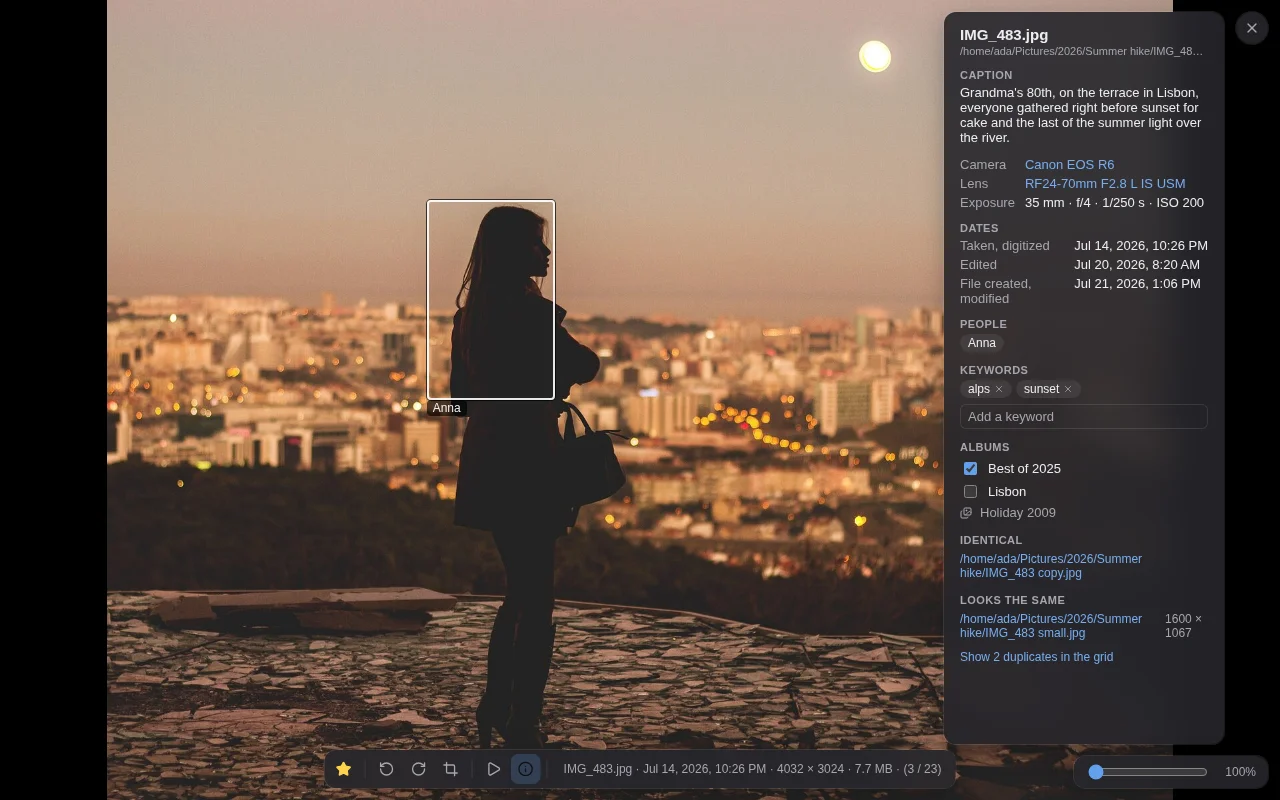
Coming from Picasa
Point photon at the folders Picasa watched. It reads what Picasa kept beside your photos,
in each folder's .picasa.ini, so none of it has to be exported or imported:
- Stars, both ways: a star set in photon is written back into that file,
touching only its
star=line, so Picasa sees it too. - People you named, outlined on the photo in the viewer.
- Albums, kept up to date as you change them in Picasa.
- Hidden photos stay hidden.
- Captions and tags, which Picasa saved into the photos themselves.
Not carried over: Picasa's own edits (crops, filters, retouching) are not applied, and an
album Picasa kept only in its database, never in a folder's .picasa.ini, does
not appear.
What it doesn't do
- No camera RAW or HEIC. Reading them means shipping a C library, and photon has no native dependencies.
- No editing beyond rotating and cropping.
- No cloud, sync or sharing. Your library stays on your computer.
- No phone app.
Install
Get the installer for your system from the latest release.
| System | File |
|---|---|
| Linux | .AppImage, or .deb for Debian and Ubuntu |
| macOS | .dmg — aarch64 for Apple Silicon, x64 for Intel |
| Windows | .msi |
photon reads JPEG, PNG, GIF, WebP, TIFF, BMP and AVIF, and plays MP4, MOV and WebM video through the system's own support. Camera RAW and HEIC are not read.
The installers are not code-signed, so macOS and Windows will warn the first time you open
photon. The README
explains how to get past that on each system, and how to check a download against its
SHA256SUMS.
Questions
Where does photon keep its library?
In a folder called io.github.bsg62.photon: the library (library.db)
under your user data directory, the thumbnails under your cache directory.
| System | Library | Thumbnails |
|---|---|---|
| Linux | ~/.local/share/ | ~/.cache/ |
| macOS | ~/Library/Application Support/ | ~/Library/Caches/ |
| Windows | %APPDATA%\ | %LOCALAPPDATA%\ |
What should I back up?
Your photos, as always. Beyond them, the library folder holds what exists only in photon: its own albums, keywords you added, rotations and crops, photos you hid, saved searches, tag renames and settings. Copy it while photon is closed. The thumbnails are rebuilt on their own if lost. Stars, and everything else photon reads from Picasa's files or from the photos, live with the photos already.
Can I move my library to another computer?
Yes, if the photos are at the same paths there: the library remembers each photo by its full path. Otherwise, let the new computer build its own library. Stars and Picasa's people and albums come back by themselves; what exists only in photon, above, does not.
Can I keep using Picasa alongside it?
Yes. Both read and write the same .picasa.ini, and photon picks up a change
Picasa makes within a few seconds of it saving the file. If Picasa has the file open at the moment you set
a star in photon, photon says so and changes nothing; try again a moment later.
How do I uninstall it?
Remove the app the usual way for your system, then delete the two
io.github.bsg62.photon folders above. Your photos are not affected either way.